![5 Smart Business Partnerships To Build]()
by Monica Callahan | Aug 30, 2015 | Business
As a modern dog trainer, we are always looking for ways to expand our training and make it fun for our clients. Dogs are becoming a bigger part of our community, and we are looking for many different ways to include our furry friends in our lives. Consider teaming up with other local businesses to offer some new, fresh classes for your clients. Consider these 5 smart business partnerships.
1. Fitness Instructors
Working out can be hard for some people, however, the thought of doing it with their best four legged friend makes it a little bit easier. Consider teaming up with a fitness instructor and offering a workout class that includes their dog and some training to go along with it. Getting exercise is important for both the owner and the dog, and doing so in a safe environment is very appealing to people. Yoga, dancing, and strength training are only the tip of the iceberg when it comes to including dogs in workout classes.
2. Doulas/Parenting Instructors
Consider teaming up with someone who offers support to new parents or parents-to-be. Expecting parents are often very nervous about how their house is going to change once the new baby arrives. Consider ‘Introducing Baby’ or ‘Preparing For Baby’ classes that you can run together and offer to clients. Bradley or Lamaze teachers may even be interested in bringing you in for a session during their class periods.
3. Local Pet Stores
Local pet stores are a great business partnership to make. Not only can some of them offer class space, but they can offer a great place to send clients for training supplies if you do not sell merchandise yourself. In return, the pet stores can advertise your classes or business by hanging signs, inserting handouts into bags, or including you in store functions. Consider including their store as a stop in your ‘Out and About’ classes where you work on behaviors in the real world.
4. Local Artists/Art Shops
There are many different places that could fit the bill for an art shop. Get creative and see about having classes where owners can paint with their dogs, whether it be on canvas or pottery. Work on teaching the dog how to dip their own paws in paint, or how to hold a paint brush.
5. Restaurants With Outside Patios
Usually restaurants allow dogs on their outside patios, however making a business partnership with a restaurant can lead to a ‘Dog’s Night Out’. Have a night where your students can come and bring their dogs, enjoy dinner together, and practice their manners in a public setting. This can be a refreshing evening for your students who have dogs that suffer from separation anxiety and may not be able to get out much.
These are only a few examples of partnerships that can lead to fun, new classes. Get creative and think about who you already know. Can they help create a new class for you? What other partnerships have you considered or do you already have?
![5 Great WordPress Themes for Dog Trainers Websites]()
by Kat Camplin | Aug 24, 2015 | Business

You’ve realized your website needs an upgrade and have decided to use WordPress to build it. One of the cool things about WordPress is you get to start with a template. Templates are basically a design framework that allow you to plug your own photos and text into and you end up with a snazzy site. Some templates come with plugins built in and some templates integrate with plugins better than others. Before purchasing a template, make sure it’s going to integrate with what you want to do.
We’ve put together the best options for paid and free templates. Why pay for a template? The paid options below come with technical support. If you’re new to WordPress and aren’t quite sure you can get started alone, paid options with support are a nice medium between full DIY and paying someone to build a site for you.
Our Favorite WordPress Themes for Dog Trainers

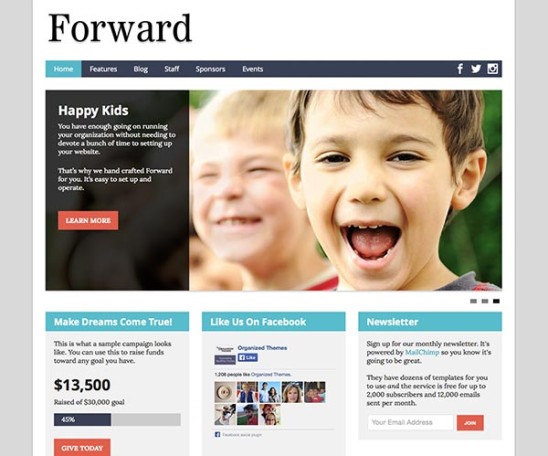
Image via Organized Themes
Organized Themes has a full range of templates available for your site. While some of them are designs for restaurants or stores with huge photos to showcase products, templates designed for non-profits are awesome, especially if you are a non-profit. Rescue organizations and humane societies can use the “Donate Now” button on the front page for fundraising efforts. If you’re not a non-profit, use the large action button for “Register today!”
All Non-Profit Themes, but we specifically like the Forward theme.
Support is delivered by a growing Knowledge Base and Support Forums. All questions in the forums are answered by the developer himself. Since he doesn’t have a full support team, customer support does have specific hours: Monday to Friday, 8:30 am to 5 pm, Central Standard Time GMT -5.
Pricing for these templates are based on either a single theme or period of access to all themes. A single theme with lifetime support and no monthly fee is $59. If you want to try out a bunch of themes before you settle on one, choose the 6 month membership for $89. This gives you access to all the templates as well as support for 6 months. If you don’t need support after the 6 months is up no further payment is needed.

Image via Elegant Themes
Elegant Themes has 87 templates, which can make decisions difficult! Since Google now drops your search placement if your website is not Mobile friendly, stick to browsing the Responsive templates. We like the clean look of the Trim template. Remember, if the template has huge photos you will need to fill those spaces with your own graphics. For many of trainers that could be a problem.
Support is delivered by Documentation, step by step guide for template installation, and Support Forums. All questions in the forums are answered by Elegant technical support.
Pricing is an annual membership fee that gives you access to all 87 templates. The best option is $69 for a year. Once you’re all set up you can cancel your subscription and keep your final website for life.

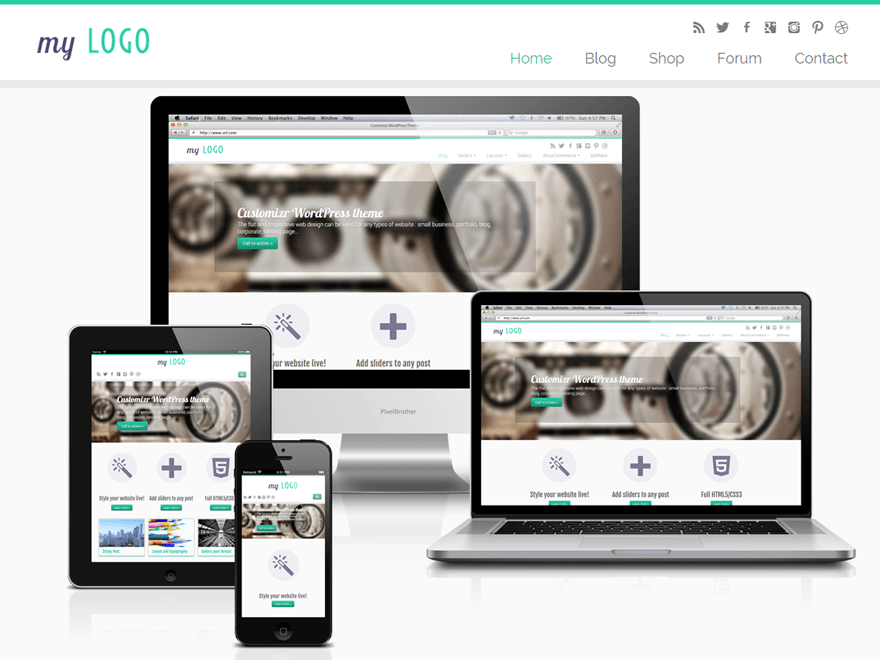
Image via WordPress
If you’re ready to go full DIY, you can download the free version of Cuztomizr, or get the Pro version, which includes access to Premium Support.
Customizr lives up to its name. It’s fully customizable with the Live Preview option, so you see your changes “live,” but unpublished. Checkboxes toggle front page items on and off, the color picker means you get to choose the exact color you want, and you get to use your own logo. This template supports most plugins and is fully responsive for mobile users.
Free Support is available through the official WordPress Customizer forum. Questions will be answered by either SuperUsers or the developer, but Super Users are more common. Start with the Documentation, some of your questions may be answered there. Paid Support is available from the developer though a Support Forum using an activation key. Questions are answered by “WordPress Experts,” which means carefully chosen Super Users and not necessarily the developer. Paid support is $44.95 per year.

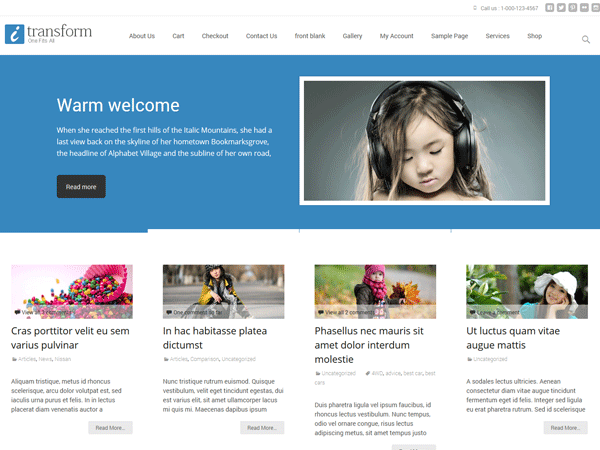
Image via WordPress
i-transform is template with smaller spaces for photos, which means you don’t need to come up with huge, splashy graphics on the home page. It’s Mobile friendly and comes with a toolkit plugin for customization. While the finished theme looks awesome, this is very much a DIY project that will require you to read the documentation on the theme and the toolkit plugin that comes bundled with it to make the initial setup easier.
Free Support is available through the official WordPress i-transform forum. Questions will be answered by either SuperUsers or the developer, but Super Users are more common. Start with the i-transform Tutorial available from the developer. Some of your questions may be answered there.

Image via WordPress
Hueman is one of the more complicated templates due to the variability of sliding menus, headers and footers, and widgets. If you offer a lot of services, have multiple locations, or a lot of staff, utilize the three column front page so visitors can find what they need easily. This template is a very difficult DIY project, so you’ll need familiarity with WordPress and templates and some coding.
Free Support is available through the developer’s Documentation, and the official WordPress Hueman forum. Questions will be answered by either SuperUsers or the developer, but Super Users are more common.
Recommended Article: 5 Must Have WordPress Plugins for Dog Trainers Websites
Get Dog Training Business Tips!
Receive valuable dog training business tips and resources every week! Subscribe to The Modern Dog Trainer now by submitting your name and email below.
[mc4wp_form]
![3 Reasons to Avoid Giving Your Dog Training Clients Discounts]()
by Ines | Aug 10, 2015 | Business
As small business owners, we’re always looking to acquire new dog training clients. Discounts are a popular option that we think you’d better avoid.
1. Dog Training Clients Who Compare Prices Are Not The Right Clients For You
In reality, clients who are looking for the cheapest trainer in town are not looking for the most qualified and skilled dog trainer. You’re better off focusing your energy trying to get clients who will value your time and qualifications. If you’re looking to give back to the community, limit your free or discounted lessons to one or two lessons a week for those in need, but don’t make it the norm for all your clients. Consider creating a scholarship program for those that need your help, but cannot afford it immediately. This will weed out people who are just looking for a quick bargain and you’ll find some truly dedicated clients who simply can’t afford your usual price.
2. It Is Very Hard To Wean Customers Off Discounts
Once they’ve had a taste of your services at a discount, it can be difficult for clients to adjust to higher prices. They may continue to ask for discounts for one reason or another. This conflict could drain your energy and it may damage the relationship between you two.
3. Cutting Your Own Profit Margins
When we give discounts as dog trainers and small business owners, we’re emptying our own pockets. Discounts cut the profit margins and they devalue the product or service a client purchases. Unfortunately, the client is less likely to follow through with training plans and are less likely to sign up for full-priced services in the future.
Fortunately, there are hundreds of alternative ways to attract new clients.
The Best Alternative To Discounts
There is a simple alternative to offering discounts for your services. Consider providing add-ons for “free” so that the client perceives that they are getting a better deal by getting additional products or services. This way you can maintain your desired income and they are getting a great deal. It’s a win-win for both sides of the client-trainer relationship.
What are some ways you attract new clients? Leave your ideas in the comments below!
Get Dog Training Business Tips!
Receive valuable dog training business tips and resources every week! Subscribe to The Modern Dog Trainer now by submitting your name and email below.
[mc4wp_form]
![Trainer Ethics: Calling Your Well Trained Dog A “Service Dog.”]()
by Kat Camplin | Jun 29, 2015 | Business

You may have missed the social media explosion resulting from a blog post by a well certified dog trainer admitting she passes off her pet dog as a Service Dog. At first glance this may not seem like a big deal. After all, the dog is well-behaved and giving a good representation of what a “well-trained Service Dog” looks and acts like. That’s not so bad, right? In fact, now that she’s come clean with her fakery, wouldn’t it be a good idea to allow all well-behaved dogs in public places? Should there be limits to where regular pet dogs can go if they’re well-trained? Maybe there should be a Pet Dog Access ID that could be earned that would allow dogs to go places. While the sentiment to allow our dogs in more public spaces is sound, the method she used is incredibly disturbing.
Before we go any further, let’s clarify some of what she admitted to.
- Telling taxi drivers her dog is a Service Dog so they would be allowed in a cab.
- Police were called when a cab driver denied her and her dog a ride.
- Having a friend create a fake Service Dog ID.
- Using the fake Service Dog ID when questioned by shop owners if the dog was a Service Dog.
While most of us can agree that going to such lengths as to call the police to perpetuate a lie is going too far, where do we actually draw the line of pushing our dogs into no-access spaces? As an example, let’s say it’s 105 degrees outside, your perfect dog is in the car, and your father was just rushed to the Emergency Room. Would you claim your dog was a Service Dog to be able to wait in the hospital lobby ? Would you push to be able go into the ER with your dog? Would it actually harm anyone if you did it? Or is harm only done if you get caught?
What is a service dog?
Service animals are defined as dogs that are individually trained to do work or perform tasks for people with disabilities.
What is a disability?
An individual with a disability is defined by the ADA as a person who has a physical or mental impairment that substantially limits one or more major life activities, a person who has a history or record of such an impairment, or a person who is perceived by others as having such an impairment. The ADA does not specifically name all of the impairments that are covered.
Let’s cut to the chase. If you don’t have a disability you do not have a Service Dog. Period. If your dog isn’t trained to do a specific task that mitigates your disability then your dog is not a Service Dog. Period.
To fake a Service Dog is illegal and insulting to people who rely on their dog to get through the day. How many daily conversations do people with disabilities need to have about their Service Dog just to get things done? We see articles all the time about businesses denying access to a person with disabilities with their dog. Just this week we saw a Purple Heart Recipient Denied Access. If you are a fake you are making it harder for people with legitimate need to get access.
In a time when we should be trying to educate businesses about what they can and can’t do, fakery only adds to the idea that everyone is faking it. A friend of mine owns a local deli which is visited by a woman with a completely unruly “Service Dog.” On the surface it would appear the dog is a fake. Aren’t Service Dogs supposed to be well-behaved? No, actually, they only need to be trained for a function. If the dog is unruly a business owner can ask them to leave. When I asked my friend why she didn’t ask her patron to leave she said, “I asked the health inspector since the dog is trying to get behind the deli counter. He said to just endure it. If I remove the woman and her dog there would be a huge backlash and I’d lose business.” Having businesses as allies is important. Why make this harder? If a business owner thinks they have no recourse if a Service Dog destroys something they’re not going to be accommodating. Trainers should be advocating for well-behaved Service Dogs and getting businesses on board, not trying to fool them.
One of the more interesting topics to come out of this social storm is what, if anything, the certifying bodies should do when one of their members makes an admission of guilt. Is a blog post enough to remove their certification? Is there a mechanism for a reprimand or probation or temporary removal of a certification? Or is it all or nothing? If we are positive reinforcement trainers advocating an ethical hierarchy to teach behavior in animals, aren’t humans animals? Do we have to go directly to +P? What is an appropriate response?
On the flip side, most of us have no idea how ethics investigations work with the certifying bodies we belong to. At least if you break a law you have some idea of the consequences. It would be beneficial to have an idea of the process of an investigation and the possible consequences, both as members and as witnesses to possible violations of standards.
As professionals, when you see another trainer presented with overwhelming evidence that they should reconsider their actions, what would you expect their reaction to be? This particular storm grew quickly because of the trainer’s gloating, defensiveness, attacking her critics, and further justifying her actions. She then took the offending blog post down and posted on her business page, “I am too busy training to argue with faceless people on the Internet.” An important lesson from this event: Once it’s on the internet you can’t get it back. Google cached it, people printed it, took screenshots of it, etc. It’s still out there. Her business page was barraged with comments. She simply could not remove them fast enough. As one popped up people replied and added more. It was The Perfect Weekend Social Storm.
Lesson: If you’re in over your head and taking attacks from all sides, step away from the computer and make a plan. As we all know, reactivity gets you into trouble every time.
For those of us who share this trainer’s certifications, we feel guilty by association. Is this what following a code of ethics looks like? Not to many of her fellow professional trainers. In this case a sincere public apology would be appropriate, both for the benefit of the profession as well as a demonstration to the Service Dog community that she understands how hurtful her actions were.
Since the blog post and firestorm happened on a weekend I’m sure there will be more to come from this story. We will post an update if more information becomes available.
![Time Tracking Software Reviews]()
by Kat Camplin | Jun 9, 2015 | Business

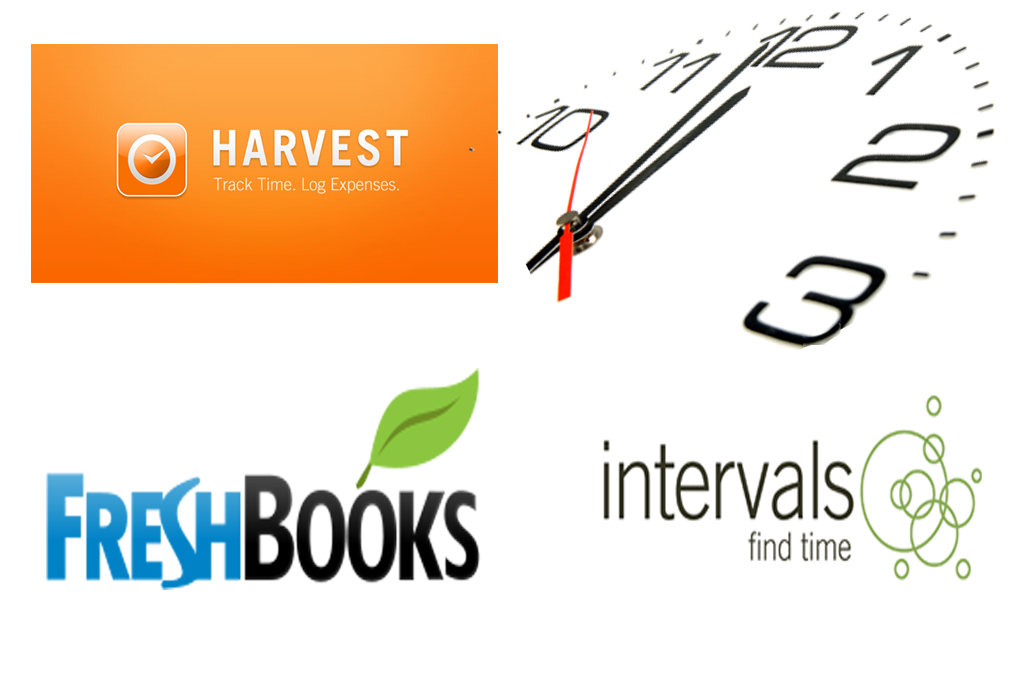
Image via Kat Camplin
For months I’ve been on a mission to find the perfect tool to track my time and my client’s time. Specifically, tracking prepaid package time for each client. On my list is a way to view package time use, alerts when payments are due, tracking prepaid money as credits, and easy invoicing. It should also be cost effective. $90 a month is out of the question. Most of my clients pay by check, so online payments aren’t a priority, but two of these systems support that function.
All of these services use a Client / Project format. The top-level is the Client and time tracking is at the Project level. This can take some getting used to if you’re not used to dealing with Projects. As an example, if you’re working for a rescue group tracking individual dogs as Projects is very handy. Each of the systems below has its pros and cons. Take a look!
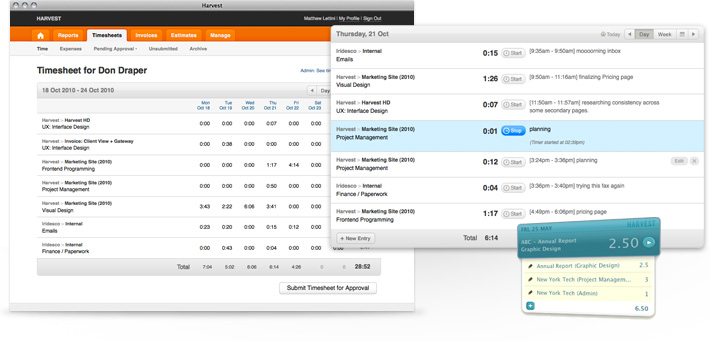
Image via Harvest
Website: https://www.getharvest.com/
Cost: 1 user – $12/mo. $10 for each additional user.
Free Trial?: Yes
With unlimited clients and projects for just $12 a month, Harvest tops the list for the solo trainer. Projects can be tracked via time or money, and the Project landing page has pretty blue sliders that show how much each Project has used and has left. You can set Project alerts based on percentage used, so you can remind your clients when there is only 1 or 2 sessions left early enough to tweak goals or talk about another package. If you charge for equipment or consumables you can add those in too.
The time tracking interface is friendly, giving you either a day view or week view to enter time against a Project. Click the day, choose the client and project, enter an hour amount and save. For the week view you can add lines for all your weekly clients and just tab across the days of the week entering your time. Putting this into your daily workflow will make this go even faster. Log your hours from the day before and stay ahead of the game. There is also an iPhone and Android app so you can log time on the go.
Invoicing is simple and you have a few choices. You can either base the invoice on previously logged hours, which pulls all your visits into single lines on the invoice, or you can do a free form invoice and fill in lines however you like. If you’re doing prepaid packages the free form invoice is a lifesaver. You fill in the cost per hour, number of hours and bam, invoice is done. Save the invoice and then you can immediately record a payment, which turns invoices into a nice receipt for your clients. You can either send clients a link to the invoice, download it as a pdf and send in an email, or print it out and send it snail mail.
You can accept online payments through Paypal Standard/Business or Stripe.
Harvest integrates with other online services on its own and through Zapier and IFTTT. If you use Quickbooks the integration is easy. To check out all integrations visit Harvest’s Integration page.
Website: http://www.freshbooks.com/
Cost: 5 clients – $10/mo. 25 clients – $20/mo. Unlimited – $30/mo.
Free Trial?: Yes
Freshbooks bases it’s cost on clients, not users. On the plus side if you’re doing a lot of rescue group work and need to track individual dogs as projects, the rescue group only counts as one client. However, if you have a large and revolving client base, archiving and un-archiving clients will be a pain. That said, I really like the idea of archiving inactive clients so you don’t have to scroll through people you don’t work with any more.
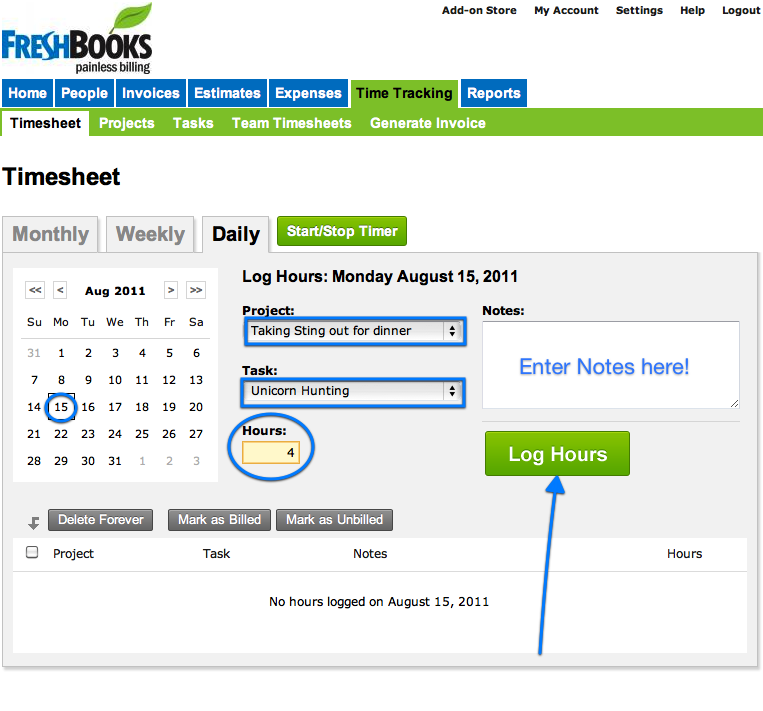
Time tracking is similar to Harvest, except you have the added option of a month view to enter time. You have the option to set hours as billed or unbilled as you log.
Freshbooks also has pretty blue sliders on the Project dashboard, but they are a little different. Instead of time used and left, the slider represents time against an estimate. You can use the Estimate time as your prepaid package time, so the slider will be a true representation of time used. The other columns show hours as billed or unbilled, which is handy if you’re tracking payment plans.
While I like how Freshbooks allows you to log prepaid credit, the credit is at the Client level, not the Project level. This means you are tracking time for the Project (dog,) but credit goes to Client (human or organization.) This can be a problem if you’re working with multiple dogs at a rescue group and invoicing is done separately per dog. You’ll have to remember which dog the credit goes towards.
Invoicing works basically the same as Harvest, you can choose between outstanding unbilled hours or enter information free form. Save the invoice and you can log a payment and send as a receipt by email or snail mail. There is no web link choice in this system.
The downside to Freshbooks is there isn’t an alert system as there is in Harvest. However, if you’re on top of your time and invoicing you really don’t need the reminders.
You can accept online payments either directly through Freshbooks or link to Paypal or Stripe. Freshbooks fees are 2.9% +.30 for Visa/MasterCard and 3.5% + .30 for American Express
There is a mobile app and lots of integrations with other systems, either directly or through Zapier. Check out the Freshbook Integration page.
Website: http://www.myintervals.com/
Cost: 15 Active Projects – $25/mo. 40 Active Projects – $49/mo.
Free Trial?: Yes
Intervals bases costs on Active Projects – not Clients or users. This can be a problem if you are handling more than 15 dogs at a time. However, Intervals adds Tasks functionality to time tracking and invoicing, which is appealing. Need to send an email or do a follow-up call for a specific Project? Intervals does that.
Document handling is also added, so if you want to keep contracts or liability waivers with your clients, you can do it all here.
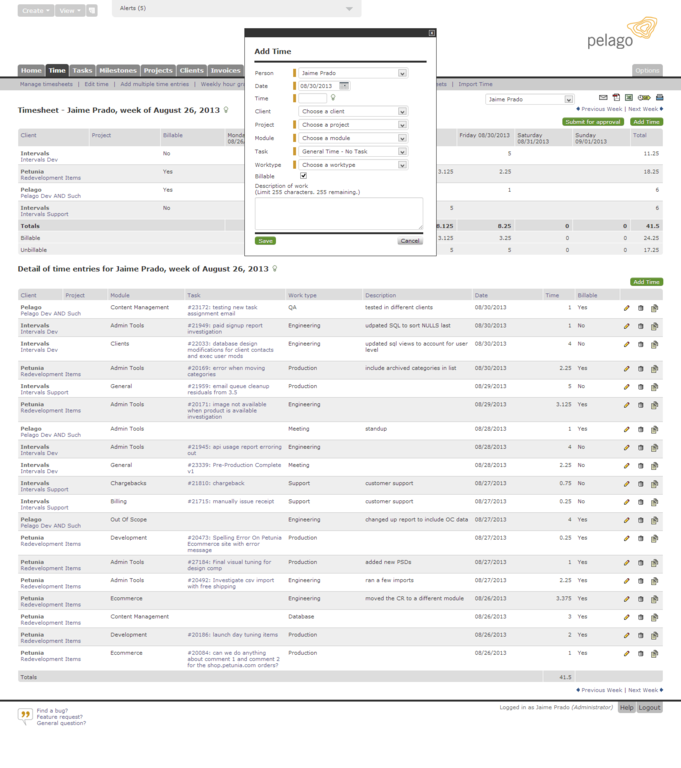
Entering time isn’t quite as easy as on Harvest or Freshbooks, but you have more ways to track your work if you choose. With the addition of Modules, you can move Projects along a pipeline. As an example, you can set up Modules for Consultation, In-home training, Public DS/CC, Group Classes, etc., and watch the progress of the dog from one level to the next.
The thing that stands Intervals apart is how it handles prepaid time. The slider on the Projects dashboard is real, not an estimate. You enter payment credits and the cost per hour and you can see exactly how much is used.
You have free form and logged hours choices for invoicing, just like the other systems. If you’re invoicing for hours logged you have the easy option of choosing starting and end dates to bill. You can add payments to the invoice as you go, which saves you the step of having to save and invoice and then adding a payment afterward. Invoices can be sent via email, saved as pdf, or printed.
Integrations are limited and there isn’t a mobile app for logging on the go. Check out the Intervals Integration page.
Intervals does send a handy daily overview report of your business, time, and outstanding invoices.
Get Dog Training Business Tips!
Receive valuable dog training business tips and resources every week! Subscribe to The Modern Dog Trainer now by submitting your name and email below.
[mc4wp_form]
![10 Most Creative Dog Training Business Card Ideas]()
by Ines | Jun 2, 2015 | Business
Business cards should quickly show who you are, what services you provide, and legible contact information. You should include a phone number, an email address, and your website at the very least. Your brand should show clearly so that people have an idea of what they can expect from you. An outstanding business card can set you apart from other businesses in your area. The following dog training business cards go above and beyond the norm.
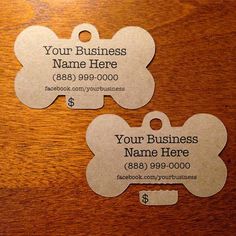
Dog Tag Mimic
The price tag tear off can easily be turned into a discount amount if someone sees your card and calls you for dog training help. The size and shape of this card can come in handy when determining where to leave it around town.
Kraftcuts
Oddly Shaped + Oddly Eye Catching
This cat tail business card idea can easily to altered into a dog’s tail to have the same effect. Its unusual size and shape can help you stand out, but might also cost a few extra dollars to produce.

Quick Sprout
Dog Behind Glass Card
This adorable card really captures your attention. It provides the viewer with a unique perspective while providing important contact information.

Design Crowd
Clicker Business Card
While most pet owners won’t know what the clicker is for, this can be a unique way to grab their attention. Accomplish two tasks at once with this clicker business info idea!

Pet Expertise
Fun + Durable
This kind of card is sure to stand out from the crowd. They are a bit more expensive, but they really make a statement.

Plastic Card Online
Clean + Informative
This card provides all the necessary information with a clean and colorful design that is pleasing to the eye.

Chelsea McKenna
Modern + Professional
Potential customers know they are getting someone who values professionalism when they call the contact info on this card.

Design Crowd
Unique + Fun
While I don’t think most people would feed this one to their dog, they might pick it up to do so before they notice the information. This business “card” is a great way to get your information into someone’s hand.
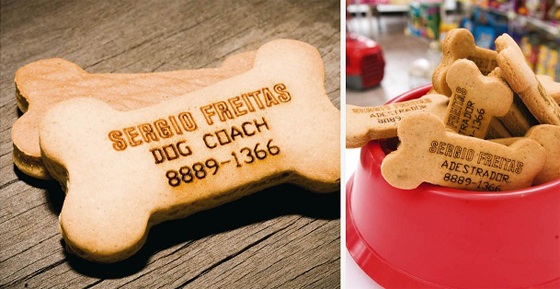
Personality + Eye Catching
This card shows a lot of personality and brings out good emotions in the person looking at it. It also makes the person curious about what it might be about.

By JB Pictures
Folded Ears
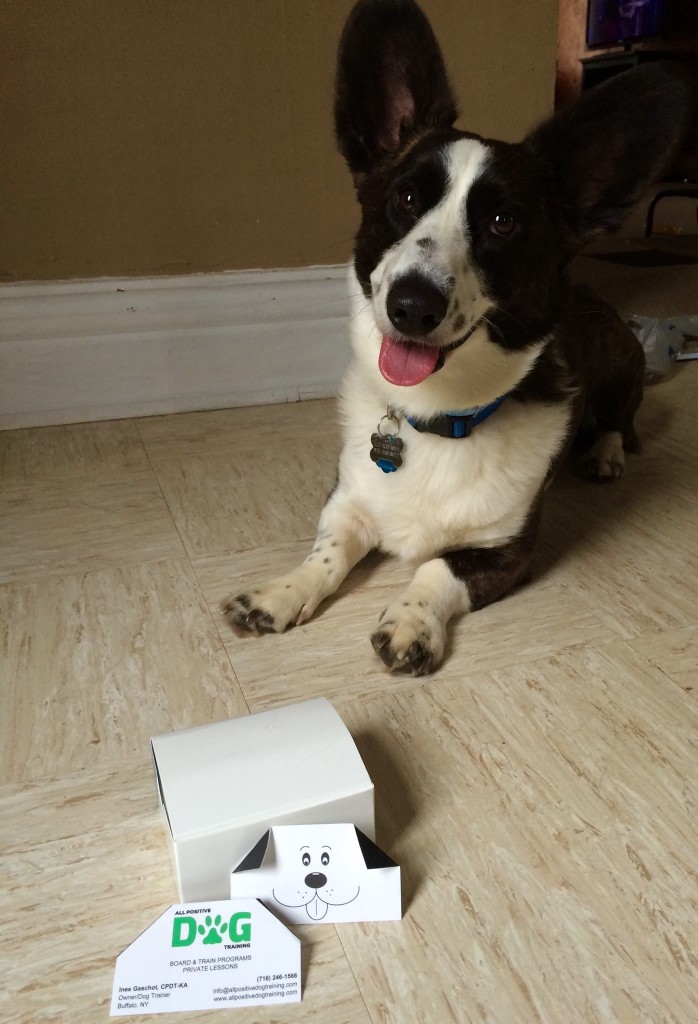

This is my personal business card that I made recently. It has received lots of positive feedback and I’ve already had one client mention that they saw my card at a local coffee shop. I’m offering the dog face and ears design for free to anyone who wants them on their business cards and you can click here and here to download them.
When you’re designing business cards, don’t be afraid to go for a 3D design. They don’t necessarily cost more if you cut or fold them yourself!
Get Dog Training Business Tips!
Receive valuable dog training business tips and resources every week! Subscribe to The Modern Dog Trainer now by submitting your name and email below.
[mc4wp_form]